Range-based project estimation
Turn unclear scope into a range you can defend.
VikaEstimate turns a brief into tasks, hours, roles, and costs. Each task carries a confidence range. Your team sees the margin before it sends the price.
- Delivery leads
- Sales engineers
- Finance teams
- Consultants
One task. A visible range.
Moderate confidence · 1× to 2×PERT weighted estimate
46.7hours- Entered / low
- 40 h
- High
- 80 h
(40 + 4 × 40 + 80) ÷ 6 = 46.7 h
PERT gives the entered hours four times the weight of each bound.- 01Range, not padding
- Confidence factors show where unknowns change the hours.
- 02Margin while you edit
- Cost, revenue, and margin move with each task.
- 03History that compounds
- Delivered hours inform the next AI suggestion.
From brief to proposal
Keep scope, price, and capacity in one conversation.
The estimate stays connected from the first breakdown to the work that your team delivers.
- 01
Brief
Paste the request or import a PDF or Word file.
- 02
Breakdown
Create sections, tasks, hours, roles, and assumptions.
- 03
Range
Give each task a confidence factor and visible bounds.
- 04
Price
See cost, revenue, and margin for the full range.
- 05
Plan
Compare scenarios and allocate role hours by week.
- 06
Share
Send a proposal, export the data, or share a read-only link.
Visible uncertainty
Show the uncertainty. Do not bury it in padding.
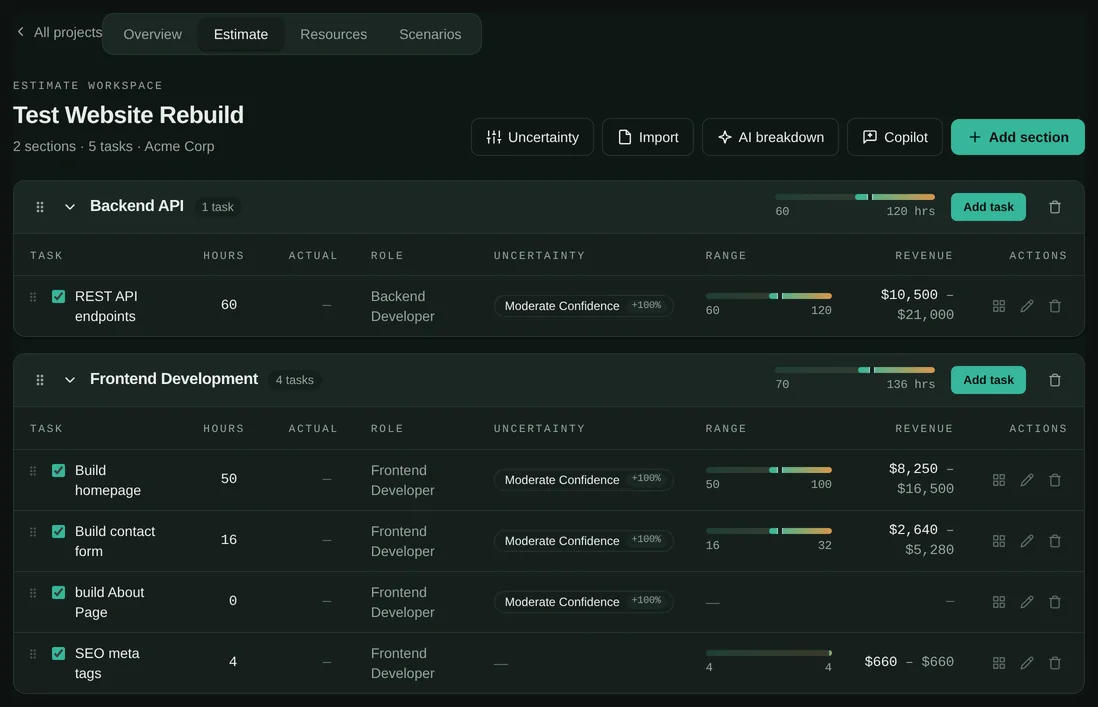
A confidence factor turns each entered value into a low and high bound. VikaEstimate rolls those bounds through every total.
- Six seeded confidence levels cover speculative work through work delivered before.
- A project can edit the names and multipliers for its own estimation method.
- Each task shows its entered hours, its range, its role, and its revenue range.
- Sections and projects roll up low, PERT mid, and high values.
- Speculative1× to 6×Pure guesswork, with no requirements
- Very uncertain1× to 4×High-level requirements only
- Somewhat uncertain1× to 3×Requirements exist, but they are vague
- Moderate confidence1× to 2×Clear requirements, with some unknowns
- High confidence1× to 1.5×Well-defined scope, and similar work behind you
- Near certain1× to 1×Exact scope, delivered before
Commercial clarity
Know the margin before the client sees the price.
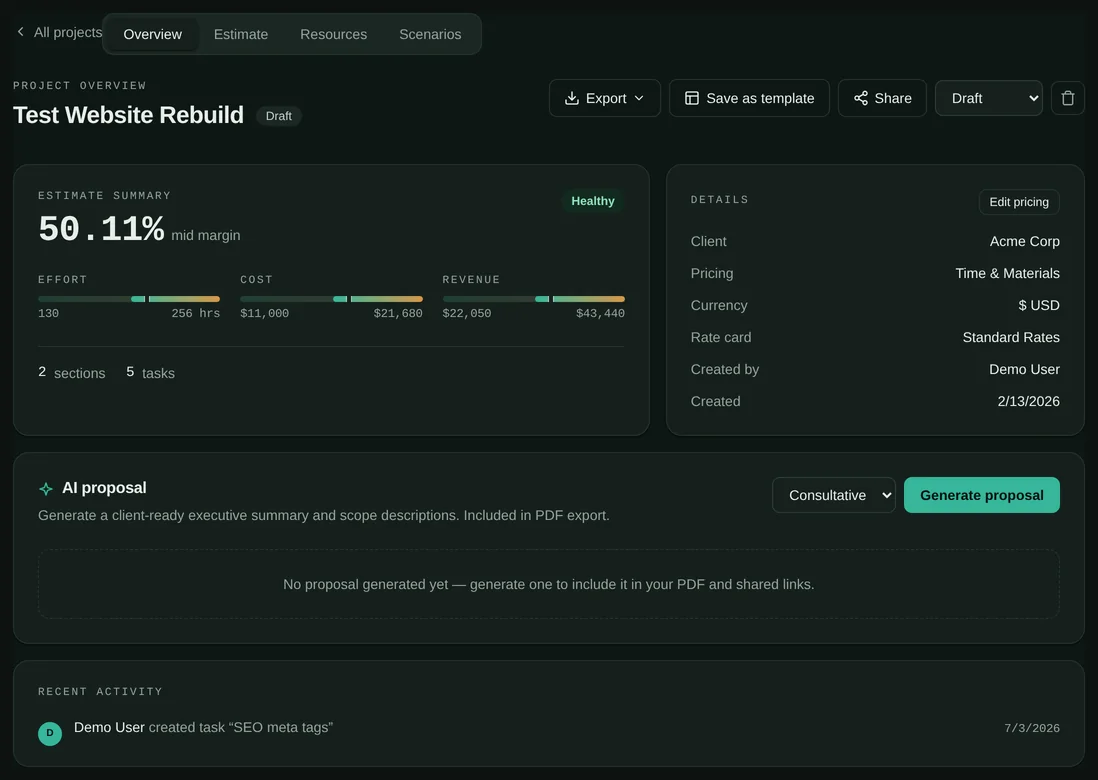
A rate card gives each role a billable rate and an internal cost. VikaEstimate updates effort, cost, revenue, and margin together.
- One calculation core
- The browser and the API call the same shared functions.
- Rates that stay historical
- Each project keeps a frozen copy of its rate card.
- Two pricing models
- Price the work as time and materials or as a fixed bid.
- A live margin range
- Read the low, PERT mid, and high margin while the scope changes.
- The mid value, stated
- PERT weights the entered hours four times: the low bound, plus four times the entered hours, plus the high bound, divided by six.
- Currency from the card
- A project takes its currency from its frozen rate card. The product never relabels a rate or converts it silently.
AI grounded in delivered work
Start with your own history, not an empty sheet.
VikaEstimate can propose a first breakdown and assist with one task. Similar delivered projects give the AI local context.
- Draft the structure
- The AI proposes sections, tasks, hours, roles, assumptions, and confidence levels.
- Assist one task
- Ask for hours, confidence, assumptions, or a smaller task breakdown.
- Retrieve similar work
- Won and approved projects provide project and section context.
- Learn from actuals
- Recorded delivery hours show estimation bias by role.
Your delivered work
- Approved projects
- Won projects
- Actual hours
- Retrieval reads one organization. Every similarity query filters on the organization identifier.
- The vectors sit in your own PostgreSQL database, not in a separate vector service.
- Tenant isolation applies twice: a guard on each organization route, and a scoped lookup in each service.
- Your deployment chooses the model provider that receives an AI request, and it can carry its own key.
Scenarios and capacity
Test the plan before you promise it.
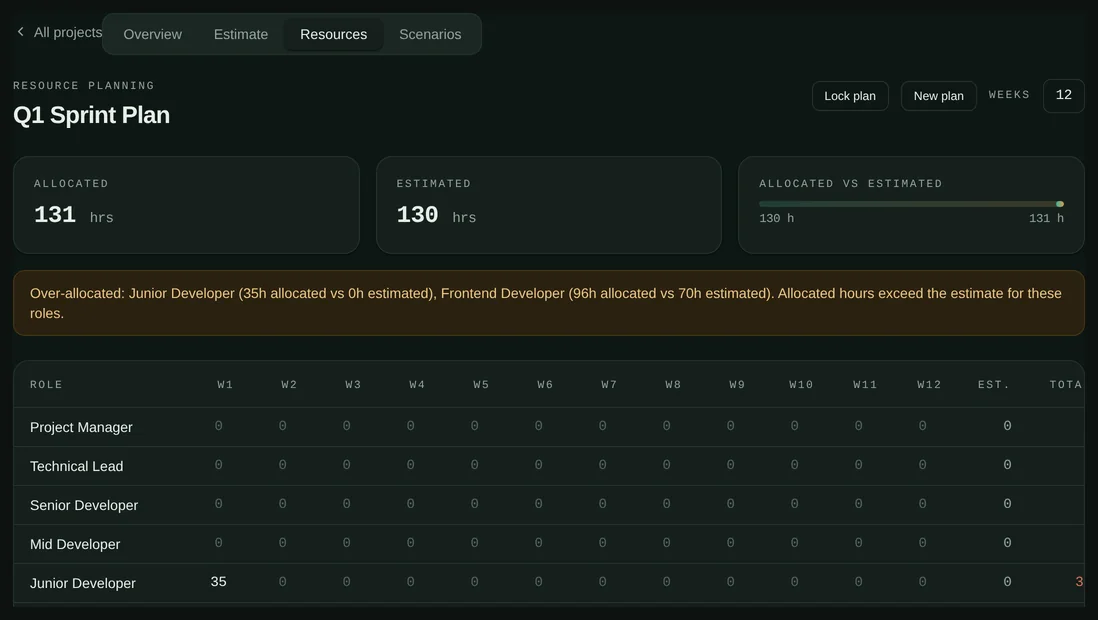
A scenario changes selected tasks without copying the full estimate. A resource plan maps role hours across the delivery weeks.
- Include or remove work and change selected hours in a scenario.
- Compare each scenario with the base effort, cost, revenue, and margin.
- Allocate role hours by week and see when the plan exceeds the estimate.
- Save a project as a template, or export it as PDF, Excel, or CSV.
- A read-only share link can have a password and an expiry date.
Illustrative scenario comparison
Private beta
Give the next estimate a reason, not only a number.
Tell us how your team scopes and prices work today. We will show where VikaEstimate can fit and where it cannot.